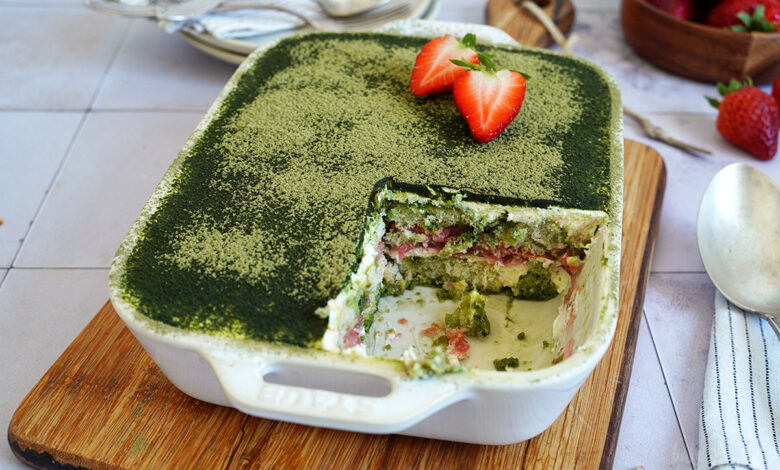
There are desserts that might not look too appealing, but when you take that first spoonful… it’s a revelation! Or at least much more keyboard than you might have expected. Many people will likely feel the same way about this Strawberry Matcha Tiramisu. Green isn’t exactly a common color for desserts and might look a bit “tricky” to some, but this tiramisu is truly incredibly delicious!

Matcha has become widespread in coffee shops around the globe lately. Almost every shop offers Matcha lattes and other “signature drinks” made with Matcha. There are some quirky combinations (eg, Banana or Pumpkin Matcha), but also truly delicious options, like the inspiration for this dessert: Strawberry Matcha latte. You have to be careful with these “signature drinks,” though. To make them as palatable as possible for the mass market, they often have quite a bit of sugar added.
Anyway. I don’t want to be promoting big coffee shop franchises here, whether intentionally or not. No coffee here today. I just want to get you excited about my delicious tiramisu with matcha and strawberries.

Almost everyone knows tiramisu, but using Matcha instead of espresso or cocoa might not be quite as common. At least not in our part of the world… meaning Germany. In Asia, things are a bit different. They really love Matcha there, so the idea of a tiramisu with Matcha instead of espresso and cocoa is not that unusual overthere…
I had my first Matcha tiramisu, who would have thought, in an Asian country. More specifically, when I was on vacation in Singapore. That was quite a few years ago, and back then, at least for me, it was still something entirely new. The restaurant where we treated ourselves to the tiramisu was 100% dedicated to Matcha. Matcha drinks in seemingly endless variations, and of course all kinds of desserts and pastries featuring Matcha to go with them. To be honest, I wasn’t really a Matcha fan back then, but the tiramisu was simply spectacular.

These days, we actually always have Matcha on hand at home. However, we rarely use it to make classic tea with it. We tend to use the green powder more often for matcha lattes or desserts. There are now several recipes here on the blog that feature Matcha: delicious Matcha Cookies, Matcha Cruffins, and refreshing Matcha Ice Cream. Those are really delicious sweet treats and today we’re adding another new recipe to the mix with this tiramisu.
When preparing Matcha as tea, it’s best to always use the highest quality Matcha, known as »Ceremonial Grade Matcha«. For baking or even for a delicious Matcha latte, you don’t need Matcha of such a high quality. The »Culinary Grade Matcha« is more than fine here. When you see the prices for the green tea powder you will probably go for that one instead of the highest quality Matcha anyway. The good one is quite expensive… No need to break the bank for a simple tiramisu, right?!


If you’re thinking, “Tiramisu with strawberries is okay, but the matcha version is still a bit too daring for me…”. Well, how about our Easy Summer Strawberry Tiramisu?! It’s a great alternative to a classic tiramisu made with strawberries. It’s also a beautiful eye-catcher with all those fresh strawberries on top.
In case you’d like to try something without strawberries and without bowls or plates, check out our Crumbl Style Tiramisu Cookies. They’re lovely, big cookies topped with mascarpone cream and a generous dusting of cocoa powder. We love these little tiramisu bombs. It’s worth noting, though, that the cookies are quite large. One of them alone is quite filling. Be warned!
INGREDIENTS / INGREDIENTS
(6 servings)
3.4 fl. oz. (100ml) hot water (80°C/176°F)
1 tbsp. sugar
1 tsp. Matcha powder*
9 oz. (250g) mascarpone
5.3 oz. (150g) Greek yogurt
1 oz. (30g) confectioners’ sugar
1 tsp. vanilla bean paste*
about 4.6 oz. (130g) ladyfingers*
5.3 oz. (150g) strawberry compote or purée
some Matcha powder* for dusting (optional), or alternatively, cocoa powder
(6 servings)
100ml hot water (80°C)
1 tbsp sugar
1 tsp matcha powder*
250g mascarpone
150g Greek yogurt
30g powdered sugar
1 tsp vanilla paste*
about 130g ladyfingers*
150g strawberry jelly or puree
some matcha powder* for dusting (optional), alternatively cocoa powder


DIRECTIONS / PREPARATION
1. Heat the water and then stir in the sugar and Matcha powder. Set it aside and let it cool down slightly.
2. Mix the mascarpone with the yogurt, confectioners’ sugar, and vanilla bean paste until well combined.
3. Place half of the ladyfingers in an approx. 19x15cm casserole dish*. The bottom should be completely covered with ladyfingers – you may need to trim some of them. Drizzle about half of the Matcha liquid over the lady fingers. Next, spread about half of the mascarpone cream over the lady fingers. Spoon the strawberry compote (or strawberry puree) over the cream and spread it evenly as well. Arrange the remaining ladyfingers in a single layer on top and gently press them into the compote/purée. Drizzle the ladyfingers with the remaining Matcha liquid and then finish the tiramisu with a layer of mascarpone cream. Refrigerate the tiramisu for at least 4 hours or overnight.
4. Dust the tiramisu with Matcha powder before serving. If that’s too much Matcha for you, you can use cocoa powder instead.
1. Heat the water and then mix it with sugar and matcha powder. Set aside and let cool slightly.
2. Briefly mix the mascarpone with yogurt, powdered sugar and vanilla paste until a smooth cream is formed.
3. Place half of the ladyfingers in an approximately 19x15cm baking dish*. The base should be completely covered with ladyfingers – you may need to cut some ladyfingers to size. Drizzle about half of the matcha liquid onto the ladyfingers with a spoon. Next, pour about half of the mascarpone cream onto the ladyfingers and spread carefully. Pour the strawberry jelly (or strawberry puree) onto the cream and spread it out as well. Place the remaining ladyfingers in a single layer in the mold and press them lightly into the groats or puree. Drizzle everything again with the remaining matcha liquid and then finish the tiramisu with a layer of mascarpone cream. Place the tiramisu in the refrigerator for at least 4 hours or overnight.
4. Dust the tiramisu with matcha powder before serving. If that’s too much matcha for you, you can also use cocoa powder.

Craving more? Keep in touch on Facebook, Instagram and Pinterest for new post updates and more. You can also contact me with any questions or inquiries!
Here is a version of the recipe you can print easily.
Description
For all Matcha fans out there – this Strawberry Matcha Tiramisu is going to be your next favorite dessert! Easy to make and really delicious!
3.4 fl. oz. (100ml) hot water (80°C/176°F)
1 tbsp. sugar
1 tsp. Matcha powder*
9 oz. (250g) mascarpone
5.3 oz. (150g) Greek yogurt
1 oz. (30g) confectioners’ sugar
1 tsp. vanilla bean paste*
about 4.6 oz. (130g) ladyfingers*
5.3 oz. (150g) strawberry compote or purée
some Matcha powder* for dusting (optional), or alternatively, cocoa powder
1. Heat the water and then stir in the sugar and Matcha powder. Set it aside and let it cool down slightly.
2. Mix the mascarpone with the yogurt, confectioners’ sugar, and vanilla bean paste until well combined.
3. Place half of the ladyfingers in an approx. 19x15cm casserole dish*. The bottom should be completely covered with ladyfingers – you may need to trim some of them. Drizzle about half of the Matcha liquid over the lady fingers. Next, spread about half of the mascarpone cream over the lady fingers. Spoon the strawberry compote (or strawberry puree) over the cream and spread it evenly as well. Arrange the remaining ladyfingers in a single layer on top and gently press them into the compote/purée. Drizzle the ladyfingers with the remaining Matcha liquid and then finish the tiramisu with a layer of mascarpone cream. Refrigerate the tiramisu for at least 4 hours or overnight.
4. Dust the tiramisu with Matcha powder before serving. If that’s too much Matcha for you, you can use cocoa powder instead.
Notes
Let your creativity shine in the kitchen!
Links marked with an asterisk