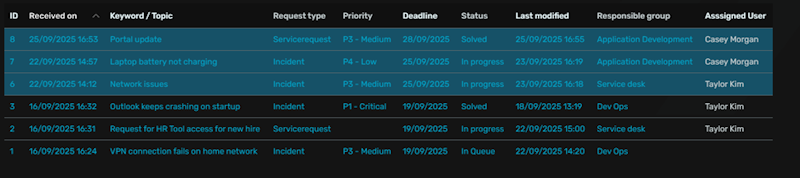
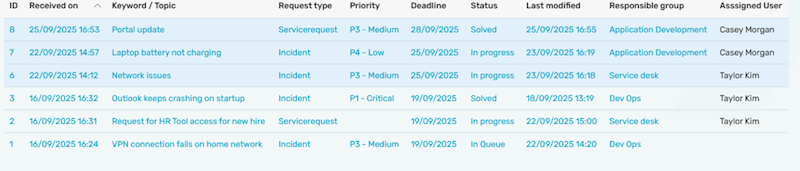
In Intrexx, it’s common to work with multiple layouts within the same application. However, switching layouts can sometimes cause inconsistencies in appearance — especially if the application uses custom CSS that applies globally across all layouts.
To ensure each layout looks its best, you can make your CSS layout-aware by using CSS variables. These variables allow you to define reusable style values (like colors, fonts, or spacing) that can be easily adjusted for each layout, without modifying every CSS rule individually.
When to Use Layout-Specific CSS Variables
A common use case is when certain elements — such as table row highlights or accent colors — should adapt to the active layout’s color scheme. For example, you might want a light blue accent in one layout and a deep green in another, while keeping the same structural CSS rules.
Defining CSS Variables in Intrexx
To set up a CSS variable in Intrexx, follow these steps:
- Navigate to the Design area of your portal.
- In the top menu, go to Edit → Edit style sheet → Edit user-defined style sheet.
- Inside your user-defined stylesheet, declare your CSS variables within the :root selector — this makes them globally available throughout your application.
Example:
:root {
  --inking-color: #165167;
}
Use cases example:
Inside the CSS of an element in the application:
.element-guid {
  background-color: var(--inking-color);
}
Inking functions loaded on a table:
inking("control", "operation", "compare value', "var(--inking-color)", "row");
Example of inking table using CSS variable on two different layouts: