

 And once again we plunge into a new year. Depending on the mood regarding the personal and general circumstances, sometimes with more, sometimes with less enthusiasm. Desktop workers and other screen-gazing people who spend a lot of time at the desktop will notice over the years that – in addition to essential exercise – there are a few things that make their time at the computer table much more pleasant.
 This may not be the first REWIND article in this vein, but it’s been a few years since the last one and there are new tools, gadgets and consumer electronics that are worth taking a closer look at. In my 20 years at REWIND and many more years at other computer workstations, my environment has constantly changed. Some things stay for many years, others come and go as needed, and others follow the course of technological developments.
The best example is the Mac itself. From tower models to laptops, smaller table Macs to fully integrated iMacs and back again to small desktop Macs (Mac Studio / Mac mini), almost everything from Cupertino’s thinking center has migrated over (and under) my desk. The Mac is and remains THE central element of attention here. For him and me it’s just a matter of creating the ideal environment. Over time, a number of useful and indispensable things have emerged. And these are currently my top recommendations for every desktop jockey:
Number Uno: The table (logical)
Over the years, the work surface in my home office consisted of, among other things, a discarded table top without a frame that sat on top of boxes and books for a few years. The solution was certainly stable, but firstly it was too small and was originally only intended for a short transition. And not pretty at all. But other things came up that delayed a quick change. At some point, however, the opportunity arose to switch to a decommissioned Ikea desk, which is incredibly stable and robust for the Swedish furniture store’s current standards. It’s still here now, but will hopefully soon be replaced by a height-adjustable desk.
Which brings us to the point: Instead of just spending money on tech hardware, you should ensure an ergonomic space as early as possible. The table is half the battle. It doesn’t necessarily have to be a pure standing table. They say sitting is the new smoking, but you can also overdo it. What should suit everyone is stability (it should be wobble-free and resilient), the right seat height and enough space on and under the table top. It should be 180 cm to 200 cm wide, 80-90 cm deep and a height adapted to your body size (preferably adjustable). If the table can then be raised completely if necessary so that you can work on it standing up, all the better. However, this also requires good cable management, which in my case, for example, is not that easy with many different power-operated and networked components on the table.
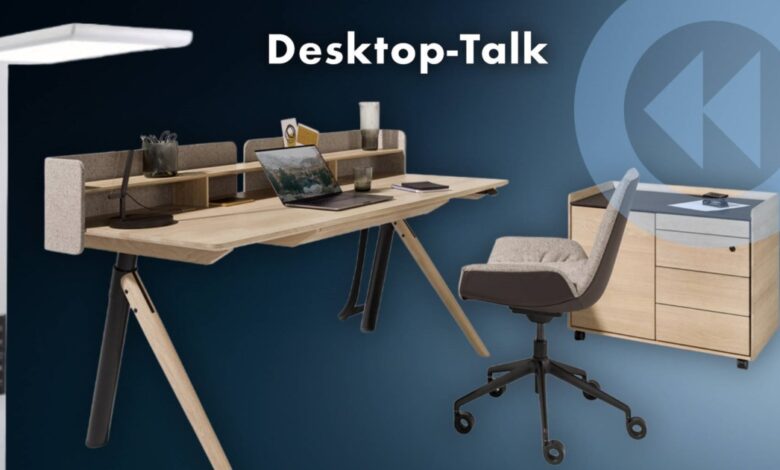
The range of work tables on offer is huge and the price range extends from grab-and-go tables (pun intended) to elegant designer furniture with all the chic chic. Your wallet decides. My special tip is aimed at those who have the necessary change and want to treat themselves to something really classy. What we mean is the TEAM 7 “Pisa” desk. A beautiful wooden desk that is available in different real wood versions and can be extensively configured in terms of size and features. Depending on the situation, the good piece costs 5,000 euros or more. The Pisa – which has nothing to do with the educational study of the same name – can be electrically extended to standing height using very subtle technology and is surprisingly stable. Even when fully extended, nothing wobbles, although it looks quite fragile. And the natural wood surfaces are a dream.

Number 2: The chair (also logical)
The topic has been discussed many times and here too there is no one recommendation for every taste and need. Everything is conceivable, from minimalist stand-sit stools to fully equipped luxury office chairs. And above all, better than kidnapping Grandma’s wooden chair from the dining table and ruining her back with it. What is particularly important here is a high-quality and durable construction combined with good ergonomics. And you should let it cost you something.
I wouldn’t have thought it myself, but I’ve been sitting on a Sato Galileo office chair for over 16 years now (see presentation in 2009). Although it was quite expensive at over 2,000 euros – especially when you look at the millions of cheap chair junk offers on the Internet – it is still as stable and wobble-free as it was on the first day, meaning the investment has long since been paid off. I didn’t have to tighten a single screw and the gas spring, the movement mechanism, the seats and the fabric are still in perfect condition. The only change: after remodeling a room, I changed the rollers from carpet to hard floors. I doubt that a “gaming swivel chair” from Temu for thirteen euros can keep up. No matter how spacey it looks.
A footrest is definitely recommended for a good swivel chair to further support healthy sitting. A simple solution like this has worked for me for a few years.
 [Sato]
The Sato Galileo is still available and still costs around or over 2,000 euros. Nothing has changed in terms of its usefulness and its design and ergonomics are still absolutely contemporary.
Third: LIGHT!
For many years I have preached that a good desktop light is essential. That is still the case today. But it doesn’t necessarily have to be the usual swivel arm or clamp lamp with an articulated arm, like my Waldmann, which I’ve been using since 2015 (over ten years again – WOW). In the meantime, I’m thinking about buying a specialized floor lamp. Why? Because of this …
While a good desk lamp like the Waldmann illuminates the desktop really well, the rest of the room remains in the dark. You work more or less in a small island of light if you don’t turn on the general room lighting, which may not provide good work light at all.
In the long run, it is more pleasant – especially in the dark season – if the periphery of the working environment is sufficiently illuminated. Special floor lamps that allow both direct and indirect lighting are available for this purpose. A good example that I might switch to soon is this lamp:

For a long time, lights of this type were only available from specialist suppliers and designer labels at very high prices. But there are now also affordable versions that, as in the case of the Luxula, even promise very high light quality (CRI >98). Dimmable and switchable for downlight and uplight, lamps like these offer an even more pleasant working environment than table lamps with limited range. It can easily be worth around 250 euros.
Fourth: storage options
Fortunately, these days we need much less or no paper at all on our desktops. This eliminates the need for special note boxes and file folders. There are actually only two folders with ancient documents left in my office. And the printer, which I only rarely use and is in another room, needs little food. There are no more notes here either. For me, temporary notes end up on a “scratch pad” in the notes app. For this reason, there are only a few pens left in my work environment.

But other things have replaced the flood of paper. For example cables and adapters, or hubs and USB hard drives. Thanks to the implementation of USB-C, the number of plug adapters is slowly decreasing, but you still need a lot of cables in everyday life. Be it for charging batteries, for the peripherals of the Mac or the desktop hi-fi system. For this reason – and for many other things – the need for a desk container is still there. This also ensures that the clutter of accessories doesn’t always lie on the table, but instead ends up neatly and protected from dust in drawers.
An under-table solution like the one featured here to hold hard drives, hubs and cables is another useful installation that I highly recommend. By the way, the TEAM 7 desk mentioned above can be ordered ex works with a very practical solution of this type.
 Mesh basket for cables, hubs, hard drives and more
Fifth: sound
Often underestimated, but like light and ergonomic sitting, good sound on the desktop also contributes to well-being. Whether via desktop speakers for music or gaming sound or music fun via headphones: a good stereo setup according to your needs and requirements completes the environment. REWIND has dealt with this topic again and again since it was founded in 2006 and I claim with a certain pride that I have contributed to the now established category and name “desktop hi-fi” to a not insignificant extent. In the early days of REWIND, this was considered nonsense. Until then, more than a few plastic roaring cubes with a rumbling bass under the table were relatively unheard of on the desktop.
 [PLAY]
Again, a blanket recommendation is impossible due to the huge range of desktop-compatible speakers and components. Simply follow REWIND and read the presentations and tests. To give a great example at a fair price, take a look and listen to the eversolo PLAY, which was the highlight of 2025 for me. Complemented by suitable, desktop-compatible passive speakers, this small streaming amp offers everything that is possible in this area today in a compact package that fits well under the monitor. And the PLAY continues to play even when the Mac is turned off, because it is the source and not the Mac.
Conclusion: Make your desktop life beautiful
These are just a few recommendations that I would like to see as an incentive to think about where and what you spend many hours in front of the screen. Everyone has their own priorities, demands and budget. There are suitable offers for almost everything.
Even in its 20th year, REWIND is making an effort to continue to provide information and help with tips from these and other areas of modern life. With this in mind: Here’s to a good year 2026! I’m going for a walk now. Sitting enough.




