




The Unicode Emoji Standard and Research Working Group (ESR) recommends adding nine new emoji to the repertoire of icons. These are intended for version 18.0 of the Unicode standard, which is due to be ratified in September 2026. The characters have the following descriptions:
- Face with narrowed eyes
- Extended thumb to the left
- Extended thumb to the right
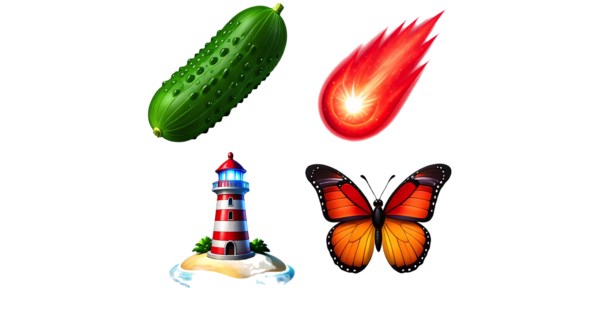
- lighthouse
- meteor
- Pickle
- Monarch butterfly
- Eraser
- Landing net


Can be interpreted by Apple
The provider of the respective operating system decides what the emojis will ultimately look like. Google and Apple generally employ fairly different styles. There is no guarantee that the nine suggestions will actually become part of the standard: the apple casing proposed last year did not make it into version 17.
Not before 2027
Apple usually waits about six months until the emojis specified in a standard are adopted into systems. The symbols integrated into Unicode 17 are not yet part of the 26 systems. Typically, the .4 update implements the expanded character range of the new Unicode version.
Do it yourself with Genmoji
If you see something among the characters that you would like to immediately include in your own visual vocabulary, you can quickly create a corresponding graphic using the Genmoji function from Apple Intelligence (from iPhone 16 Pro or Apple Silicon Mac). In the messaging app, an icon appears in the emoji palette next to the search slot. Tap or click it to start the wizard. Alternatively, open the “Image Playground” app and select “Genmoji” from the style drop-down menu. Then enter a term (or a short phrase) that you would like to have implemented in the text field below. After clicking on “Add”, they are now part of your own sticker palette; The graphic can be forwarded to other apps or moved to the clipboard using the three-point menu and the “Share” entry.


With Apple Intelligence, you can quickly create many of the future standardized emojis yourself.
Not all of them succeed
Apple Intelligence easily converts words like pickle, monarch butterfly and meteor into cropped graphics for the Messages app. The results are also detailed enough with a size of 768 pixels. For “Lighthouse,” Image Playground really wanted to add a face or person. Only when we added additional terms like “no lamp” and “island” as additional factors was Apple Intelligence ready to produce an authentic lighthouse. Other motif suggestions failed completely: “Thumbs to the left” unfortunately did not produce any useful results, and “Face with squinted eyes” also did not meet our expectations.


Image Playground doesn’t want thumbs pointing anywhere but up. The critical look, in which the eyelids are narrowed into visual slits, is also not convincingly presented by Apple Intelligence.