


The way people work with software is changing. Instead of clicking through menus and memorizing where every setting lives, teams increasingly prefer to describe what they want and let an agent handle the rest. AI assistants are showing up inside the tools we already use — answering questions, taking action, and removing the busywork between intent and outcome.
Enterprise platforms should work the same way. A modern integration and API platform holds an enormous amount of context about what an organization is running, but that context has traditionally been spread across dashboards, reports, and forms that you have to know how to find. The information is there; getting to it is the work.
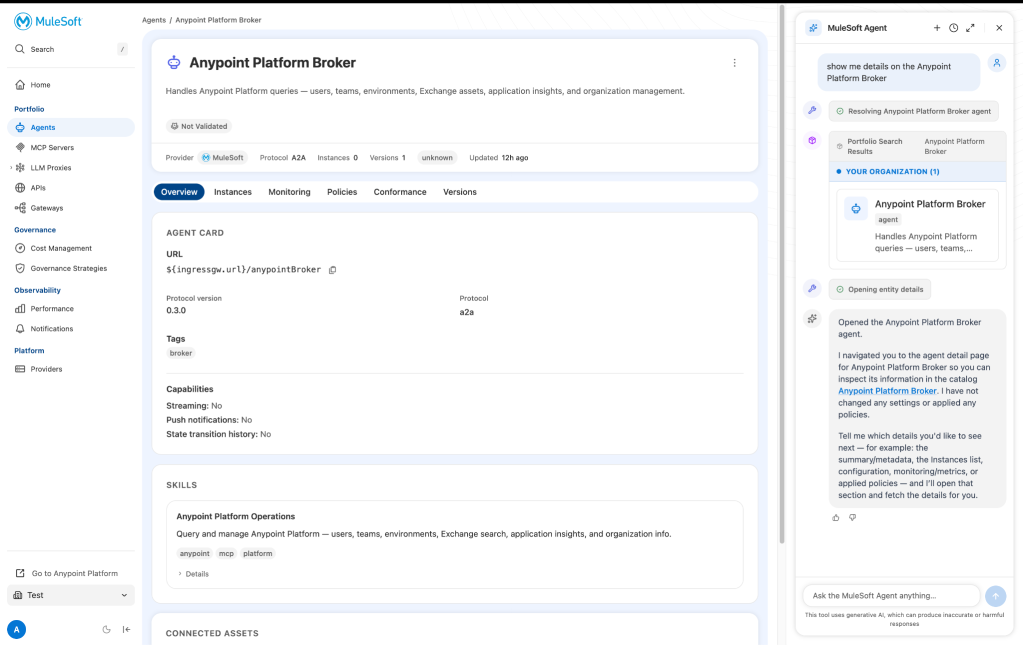
Meet the MuleSoft Agenta conversational agent embedded natively in the new enhanced experience at omni.mulesoft.com. We previously discussed reaching MuleSoft from the AI workspaces and IDEs your team already lives in. This is the other side of that story: making the platform itself something you can simply talk to. Ask it about what’s running in your environment, or ask it to make a change. Instead of leaving you to find the right screen, it can even bring you there.

Stop switching tabs, and start asking
Visibility shouldn’t be a scavenger hunt. Which models are consuming the most tokens? What’s connected to a given service? What policies are applied to a particular API? For too long, every answer required knowing exactly where to look.
The embedded MuleSoft Agent changes that. Ask in plain language and receive a direct answer, grounded in what is actually running in your org. Your environment becomes available on demand.
Also, because the agent is scoped specifically to your assets MuleSoft manages, the agent is built for real work rather than novelty. It understands where you are in the UI and what you have access to, ensuring that every answer and every action lands in your exact context.
Not just telling, but showing
The MuleSoft Agent works across the platform tasks teams reach for most:
- scan: Run scanners, pull up scanner details
- register: List specific services, create API instances
- Gov: Apply policies to API instances, create governance strategies
- Observe: See monitoring overviews, pull up cost management details
When you ask the MuleSoft Agent to do something, it doesn’t try to do everything invisibly behind the scenes. It first tries to navigate you to the right page and pre-populates the form with what it understands from your request. You land exactly where the work happens, with the fields already filled in, which you can then review, adjust anything you want, and confirm.
That design is deliberate. You stay in control of every change that touches your environment. The agent removes the friction of finding the right screen and typing out the configuration; you keep the final say on whether it ships. It’s the difference between “where is that setting and what goes in each field” and “here the form is, here’s my best draft, you decide.”
See it in action
Watch the embedded MuleSoft Agent navigate plain-language requests inside the enhanced experience:

Getting started
There’s no new license to buy. The MuleSoft Agent is currently operating in limited availability and is available to customers upon request. If you are a MuleSoft customer, reach out to your account executive to ask how you can enable the MuleSoft Agent in your organization.
Headless MuleSoft brought the platform to the tools your team already uses. The MuleSoft Agent brings that same intelligence inside the platform, turning the enhanced experience from a place you navigate into one that navigates with you. It’s another step towards an operating model where finding the right screen and filling out the right form is no longer the work. The work is just deciding what you want to do.