


Every B2B integration team eventually hits the same wall. A partner sends a perfectly valid EDI document and you translate it — then another partner sends the same transaction using the same standard but different codes, so you fork the map. Then a third partner arrives. Someone needs to update a partner ID, and suddenly a developer is redeploying transformation logic to change what is, at its core, a single data point.
This is the hidden challenge of B2B integration: not building the first map, but sustaining the twentieth variation of it — reference data and partner exceptions buried in map code where every change requires a developer to update and redeploy. When that developer leaves, or a partner changes an ID, or a new trading partner comes onboard, the cost of that approach becomes impossible to ignore.
Anypoint Partner Manager‘s Lookup tables are designed to eliminate that challenge by moving reference data — partner IDs, qualifier mappings, purpose codes, and per-partner exceptions — out of your map code and into managed, queryable tables where updates are row edits, exceptions are override rows, and every map shares one source of truth without requiring a redeploy.
The cost of hardcoding reference data
Underneath every inbound EDI map is the same baseline work: translating between two vocabularies. Their partner ID becomes your internal customer record. Their reference qualifier (VR) becomes your ERP field name (VENDOR_ID). Their purpose code becomes your order action (CREATE). The standard tells them what to send — it doesn’t tell you how your backend interprets it.
On top of that baseline, partners deviate. Different codes for the same concept. Their own identifiers. Non-standard qualifiers that are perfectly logical from their side but need normalizing on yours. The traditional response is to fork and customize. A copy of the map per partner, until you’re maintaining a dozen near-identical transformations — with reference data and exceptions alike buried in if/else ladders and inline constants that only one developer remembers the reason for. When that developer leaves, a partner changes an ID, or you onboard a new trading partner, the cost becomes visible. Lookup Tables make it manageable before it gets there.
What Lookup Tables give you
- Reference data that anyone can update. A qualifier mapping or partner ID lives in a table row, not in deployed code. An operations analyst can correct it; no developer, no redeploy, no risk of touching transformation logic to change a data value
- One source of truth across every map. Every transformation that needs to resolve a partner ID or a reference qualifier calls the same table. Fix it once, and every map that uses it reflects the change immediately
- Partner exceptions without map forks. When a partner sends a non-standard code, you add one override row. The map never changes. The exception is isolated, visible, and editable by anyone with table access
- Bulk operations for real partner counts. Tables support CSV import and export, so onboarding a new partner or refreshing reference data from a system of record doesn’t mean manual row entry at scale
Lookup table types
A lookup table’s type.type defines its structure and integrity — how it’s keyed and what uniqueness it enforces. There are two in Partner Managers.
Composite key: One or more key columns resolve to value columns. You give the key, you get the row. Use it when you have an identifier and need its attributes: given a partner ID, return their bill-to and sold-to.

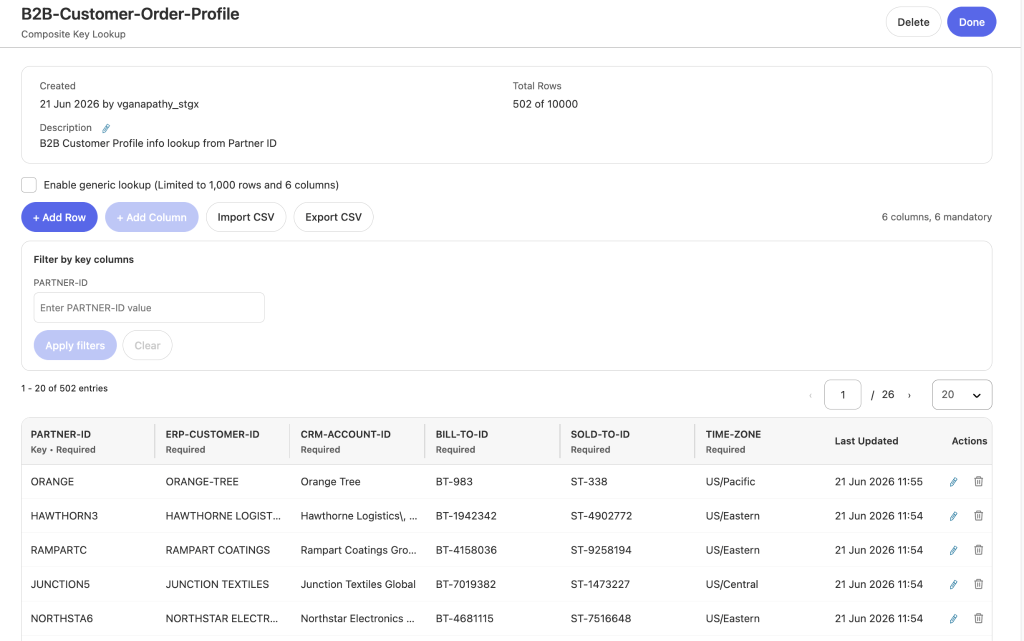
b2bCompositeKeyLookup("B2B-Customer-Order-Profile", { "PARTNER-ID": partnerId }, false)Cross reference: The same value wearing a different code in every system (a product that’s SKU-5520 internally, FRC-10050 to the partner, MAT-880033 in the ERP). It has multiple key columns — at least two — so you can enter on any keyed column and retrieve the rest of the row; non-key columns ride along in the result but aren’t independently queryable.
It’s bidirectional across the keyed columns, which only holds when those rows are true one-to-one equivalences. The moment many inputs converge on one output, that property breaks, and the data belongs in a composite key instead.

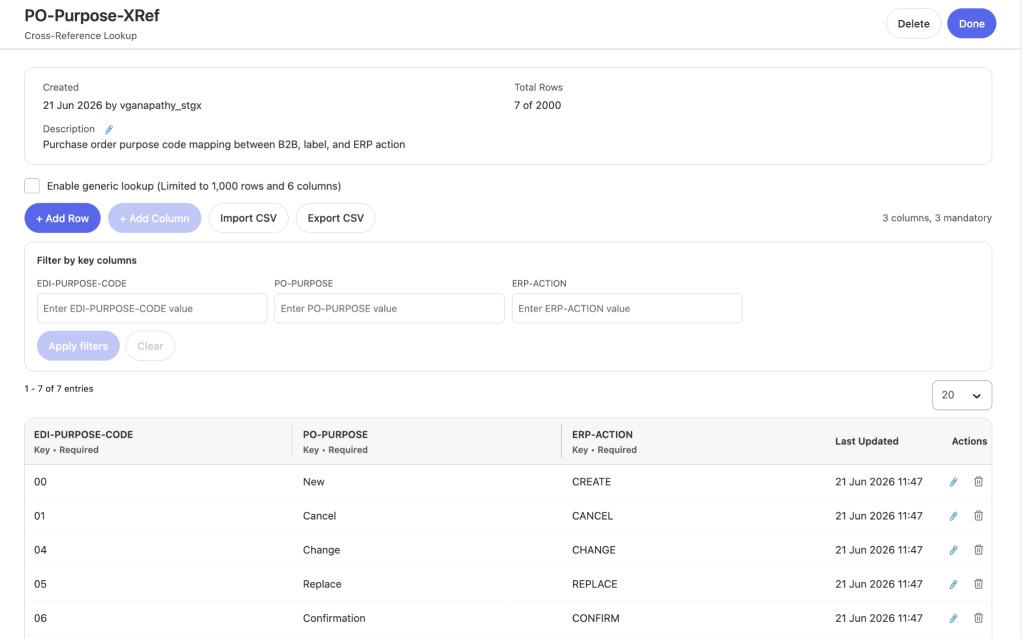
b2bCrossReferenceLookup("PO-Purpose-XRef", "EDI-PURPOSE-CODE", beg01Value, false)Both functions return a { status, errorMessage, data } envelope and take an optional failIfNoMatchFound flag (default true; set false to return empty data instead of throwing, so you can supply your own default).
2 simple ways to read tables
The keyed functions above are the native access path: precise, one row per call. But you can also enable generic lookup on either table type. This doesn’t change what the table is — a composite-key table stays a composite-key table, keeps its integrity, and its keyed function still works exactly as before. It simply adds set retrieval: reading back many rows at once instead of one.
Example: A Composite Key Lookup Table,’Inbound-Ref-Type-Mapping’ is enabled for generic lookup.

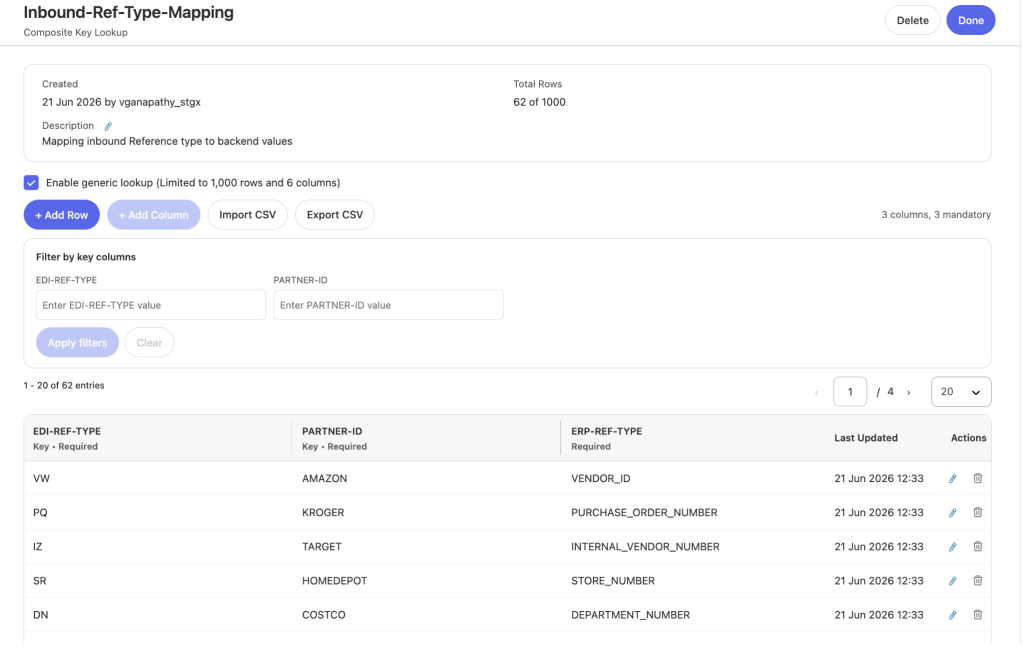
There are two set-retrieval functions. The first returns the entire table as an array:
b2bGenericLookup("Inbound-Ref-Type-Mapping", false)The second takes a key object and returns only the matching rows — the filter happens before the data comes back, so you transfer just the slice you need:
b2bGenericLookupWithFilter("Inbound-Ref-Type-Mapping", { "PARTNER-ID": partnerId }, false)The filter key can be partial. The ref-type table is keyed on (EDI-REF-TYPE, PARTNER-ID), but filtering on PARTNER-ID alone returns every row for that partner.
Why retrieve a set at all when the keyed functions hand you the exact row? Resolving many values in a loop. An 850 with a dozen reference segments resolved one row at a time is a dozen keyed calls per document; with a partner-then-default fallback, up to two each. Instead, pull the relevant rows once at the top of the map and filter them in memory by reference. That’s the whole trade-off space:
| Function | Filters by | Returns |
|---|---|---|
| b2bCompositeKeyLookup | exact key object | one row |
| b2bCrossReferenceLookup | one column = value | one row |
| b2bGenericLookup | nothing | the whole table |
| b2bGenericLookupWithFilter | key object (partial OK) | matching rows |
All four return the same { status, errorMessage, data } envelope and take the failIfNoMatchFound flag. The choice for in-loop resolution comes down to how much you pull back: b2bGenericLookupWithFilter fetches only the rows that matter (the right default when a filter column narrows the set sharply, as PARTNER-ID does), while b2bGenericLookup makes sense only when you genuinely need every row or no column narrows it. Both beat keyed calls in a loop; neither suits a table too large to hold the working set in memory.
The override pattern: Specific beats general
This is the feature that turns lookup tables into a partner management strategy. Most rules are universal — BM means bill of lading no matter who sent it — and live as DEFAULT rows in a composite-key table. But some partners deviate: one sends MB for the same concept. Rather than fork the map, add one override row keyed to that partner. The override aliases the partner’s non-standard qualifier to the same standard ERP type — MB for ORANGE still resolves to BILL_OF_LADING, exactly as BM does. The backend value remains partner-agnostic; only the inbound code differs.
This requires the partner in the key. Key on the qualifier alone and (PO, DEFAULT) and a PO override collide as duplicates — the table rejects the second at import. Make the key composite (qualifier and partners) and they become distinct rows. Resolution is then a precedence rule — partner first row, fall back to DEFAULT, fall back to the raw value — and it pairs naturally with filtered retrieval: pull this partner’s rows and the DEFAULT rows in two filtered calls, then resolve against both slices in memory.
fun resolveRefType(qualifier: String) =
    ((refTypePartner filter ($."EDI-REF-TYPE" == qualifier))[0]."ERP-REF-TYPE"
        default (refTypeDefaults filter ($."EDI-REF-TYPE" == qualifier))[0]."ERP-REF-TYPE")
    default qualifier
Managing reference data at scale
Tables are bulk-operable through CSV import/export, which makes “managed reference data” practical at real partner counts. Import has two modes: Append adds rows and keeps existing ones (incremental onboarding), while Replace table swaps the whole set atomically (bulk refresh from a system of record or a corrected master file). Export closes the loop — pull a table down, bulk-edit it in a spreadsheet, re-import; or export from QA and import to production so reference data travels with the integration as a versionable artifact.
Worked example: An inbound 850 from partner ORANGE
An X12 4010 850 from partner ORANGE ordering coffee equipment from fictional supplier Mythicalmapped to canonical purchase-order JSON. Three tables back it: a composite key B2B customer order profile (ORANGE → BT-983 / ST-338), a composite key Inbound ref type mapping with generic lookup enabled — keyed on EDI-REF-TYPE + PARTNER-ID, holding DEFAULT rules plus the MB → ORANGE → BILL_OF_LADING override — and a cross reference PO-Purpose-XRef (00 → New / CREATE). Two types; the ref-type table is read with a filtered retrieval so we pull only the DEFAULT and ORANGE slices and iterate them.
All three resolve at the top of the map:
var partnerId = payload.TransactionSets.v004010."850"[0].Group.GS02 default "DEFAULT"

var customerProfile = b2bCompositeKeyLookup(
    "B2B-Customer-Order-Profile", { "PARTNER-ID": partnerId }, false).data default {}

var refTypeDefaults = b2bGenericLookupWithFilter("Inbound-Ref-Type-Mapping", { "PARTNER-ID": "DEFAULT" }, false).data default []
var refTypePartner  = b2bGenericLookupWithFilter("Inbound-Ref-Type-Mapping", { "PARTNER-ID": partnerId }, false).data default []

var poPurpose = b2bCrossReferenceLookup("PO-Purpose-XRef", "EDI-PURPOSE-CODE",
    payload.TransactionSets.v004010."850"[0].Heading."020_BEG".BEG01 default "", false).data default {}
The cross-reference replaces a hardcoded if/else on BEG01 — both the label and the ERP action now come from one lookup, and a new purpose code is a table row, not a code change. The composite key enriches the order with internal bill-to/sold-to IDs alongside the partner-supplied values.
The override-aware resolver normalizes every reference segment:
purchaseOrderPurpose: poPurpose."PO-PURPOSE" default "Update",
erpAction:            poPurpose."ERP-ACTION" default "REVIEW",
billToId:             customerProfile."BILL-TO-ID" default "",
soldToId:             customerProfile."SOLD-TO-ID" default "",
orderReferences:      v850.Heading."050_REF" map (ref, idx) -> {
    referenceType:  resolveRefType(ref.REF01 default ""),
    referenceValue: ref.REF02 default ""
}
The deployed flow produces (abridged):
{
  "purchaseOrderPurpose": "New",
  "erpAction": "CREATE",
  "billToId": "BT-983",
  "soldToId": "ST-338",
  "orderReferences": [
    { "referenceType": "VENDOR_ID",  "referenceValue": "27097115" },
    { "referenceType": "BILL_TO_ID", "referenceValue": "27097115" }
  ]
}
Every resolved field traces to a table. This document carries standard qualifiers, so all resolve via defaults, but the moment ORANGE sends an MB segment, the override fires and resolves it to BILL_OF_LADING while everything else stays on defaults. The exception is one row; the map never changes.
Choosing the approach
- Identifier → its attributes → Composite Key
- Same concept, different codes per system → Cross-Reference (only when truly one-to-one)
- Partner overrides on global rules → composite key on (concept + partner), resolved specific-beats-general — and keep the override’s ERP type standard, never partner-specific
- Many values resolved in a loop → retrieve the rows once with b2bGenericLookupWithFilter (or b2bGenericLookup if you need the whole table), then filter in memory rather than calling per item
demo
Watch the to see lookup tables in action as a real EDI purchase order is translated to an internal data model with lookups enriching the field mappings.

Learn more about Partner Manager
B2B integration is, underneath, a translation problem: two systems that name the same things differently, and a layer of partner-specific exceptions on top. Lookup Tables give both a home outside your map code – the everyday reference resolution that connects EDI to your backend, and the deviations that would otherwise fork your transformations. The standard partner resolves their bill-to and sold-to from one keyed lookup; the partner who sends a non-standard qualifier resolves it from one override row. Either way, the rule is data an analyst can edit — not code a developer has to redeploy.