


Testing is critical to integration development, but let’s be honest: writing MUnit tests can feel like a chore. You need to account for happy paths, error scenarios, edge cases, and realistic mock data. It’s time-consuming work that often gets deprioritized.
MuleSoft Vibes: Generative MUnit Tests changes that. This feature uses generative AI to create complete MUnit test suites directly from your Mule flows, including mock data that mirrors your actual payloads.
In this tutorial, we’ll cover:
- How to use MuleSoft Vibes to generate MUnit tests for an existing Mule application in minutes
- How to generate a complete MUnit test suite from a Mule flow using natural language prompts
- How Vibes creates realistic mock data based on your application metadata
- How to modify and extend generated tests for additional scenarios
Prerequisites
- Anypoint Code Builder (Desktop or Cloud IDE) with MuleSoft Vibes enabled
- An existing Mule project with at least one flow to test
Steps for getting started
For this tutorial, we’ll use a simple login flow that accepts a POST request with username and password. If credentials match (mule/mule), it returns a success HTML page; otherwise, it returns a failure HTML page. This flow has two distinct paths (successful and unsuccessful login), making it a perfect candidate for unit testing.
Step 1: Open your project and launch vibes
Open your Mule project in Anypoint Code Builder. Click the Mule vibes icon in the Activity Bar to open the AI assistant panel.
Step 2: Generate the MUnit test suite
Now, let’s ask Vibes to generate tests for our login flow. Enter the following promptly in the Vibes chat:
Generate MUnit tests for the DoLoginFlow in login.xml. Include tests for both successful and unsuccessful login scenarios. Generate appropriate mock data for each test case.Mule Vibes wants:
- Analyze the login.xml file to understand the flow structure
- Identify the Choice router and its two branches
- Generate a test suite file (eg, login-test-suite.xml) in src/test/munit
- Create mock data files (payload and attributes) in src/test/resource

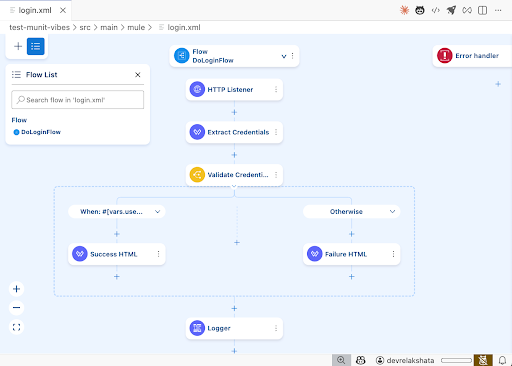
Step 3: Review the generated test suite
Once Vibes completes, navigate to src/test/munit/ and open login-test-suite.xml. You should see two tests:
- DoLoginFlow test (Successful login scenario)
- DoLoginFlow-unsuccessful (Failed login scenario)

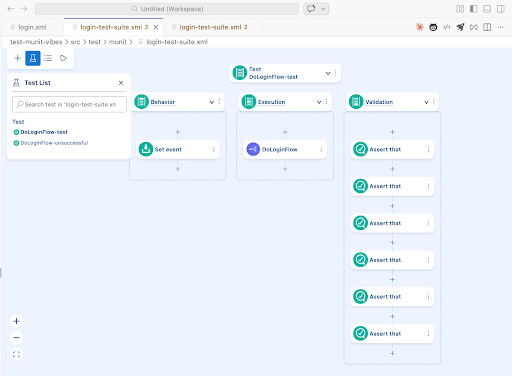
Each generated test follows the standard MUnit pattern:
| Section | Purpose |
|---|---|
| munit:behavior | Sets up the input event (payload and attributes) using the generated mock data |
| munit:execution | Invokes the flow under test via flow-ref |
| munit:validation | Asserts the expected output and verifies that the correct branch was executed |
Successful login test example
Step 4: Examine the generated mock data
Vibes also generates realistic mock data based on your flow’s metadata. Navigate to src/test/resources/ to find:
- DoLoginFlowtest/set-event_payload.dwl – Payload for successful login
- DoLoginFlowtest/set-event_attributes.dwl – HTTP attributes (headers, method, etc.)
- DoLoginFlowunsuccessful/set-event_payload.dwl – Payload for failed login
Successful login payload example
{
 "username": "mule",
 "password": "mule",
 "Submit": "Submit"
}
Unsuccessful login payload example
{
 "username": "invalid_user",
 "password": "wrong_password",
 "Submit": "Submit"
}
Step 5: Run the tests
Right-click on login-test-suite.xml in the Explorer. Select Run MUnit tests. Then, observe the results in the MUnit panel. Both tests should pass, confirming that the unsuccessful login path returns the failure HTML, and the successful login path returns the expected HTML.

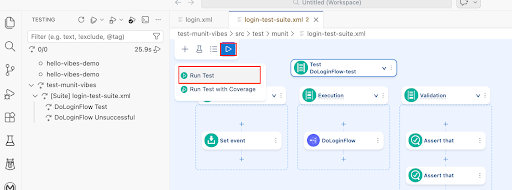
Step 6: Add a new test scenario
What if you want to test a specific edge case? Simply ask Vibes to add it.
Add a new MUnit test for DoLoginFlow that tests when the username is empty. The test should verify that the login fails.Mule Vibes will add a new test case to the existing test suite, generate mock data with an empty username field, and configure the validation to assert the failure path.
Step 7: Modify an existing test
You can also ask Vibes to update tests as your flows evolve.
Update the DoLoginFlow-unsuccessful test to also verify that a logger was called with the message "User is trying to login".Vibes will modify the section to add a verify-call assertion for the Logger component.
| feature | Benefit |
|---|---|
| Generate a complete test suite | Analyzes flow logic and creates tests for all paths |
| Create realistic mock data | Uses application metadata to generate accurate payloads |
| Add new test scenarios | Responds to natural language requests for edge cases |
| Modify existing tests | Updates tests as your flows evolve |
Streamline your testing today
MUnit Tests reduces the friction of writing unit tests, letting you focus on building integrations instead of tedious test setup. Whether you’re starting a new project or improving coverage on legacy applications, Vibes helps you test earlier and ship with confidence.
- Explore more prompts: Try asking Vibes to generate tests for flows with error handlers, Try-Catch blocks, or external system calls
- Integrate with CI/CD: Run your generated MUnit tests as part of your pipeline to catch regressions automatically
- Read the docs: Visit MuleSoft Documentation for more on MUnit best practices