


Protecting business operations and assets from potentially devastating, long-term damage makes security a core pillar for every organization. At Salesforce, where trust is our top priority, we are responsible for ensuring that MuleSoft APIs and integrations utilize secure communication methods and transaction protocols across all end systems.
With this objective in mind, implementing SSL (Secure Sockets Layer) or TLS (Transport Layer Security) certificates within MuleSoft CloudHub is essential for protecting API traffic and building a reliable integration network.
Key objectives for implementing SSL certificates within your MuleSoft architecture:
- Data encryption in transit (Confidentiality)
- Enabling custom domain names (branding and routing)
- Mutual TLS/Two-way SSL (Strong client authentication)
- Regulatory and industry compliance
How to generate MuleSoft CloudHub SSL Certificates
CloudHub SSL certificates play a pivotal role in securing the communications between clients (end systems) and Mule applications by enabling HTTPS encryption, that means all data transmitted over the network are encrypted, sensitive information like credentials, payload data are protected from confidential threats and sniffing.
In CloudHub 1.0, SSL certificates are primarily used with custom domains and load balancers to secure inbound traffic to Mule applications. They allow organizations to expose APIs over HTTPS using their own domain names, ensuring compliance with enterprise security standards and enabling secure integrations with external systems.
In CloudHub 2.0, certificates are applied within Private Spaces and ingress configurations for securing vanity (custom) domains and ensuring encrypted communication across distributed, Kubernetes-based runtime environments.
How does MuleSoft SSL certificates’ One-Way SSL authentication work?
SSL authentication ranges from simple server validation (one-way) to full mutual trust (mTLS), with mTLS being the most secure for enterprise integrations. However, in Anypoint Platform One-Way SSL certificate authentication is enabled across Salesforce’s Digital Enterprise Technology organization.

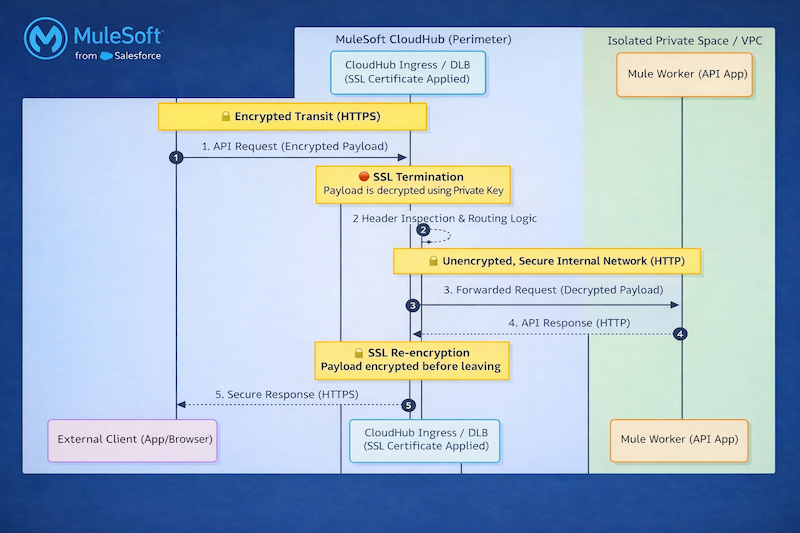
- Domain: The hostname used by the ingress layer to terminate TLS and route traffic securely to your application
- Types: External and internal domains
- External domains: External certificates are certificates presented by any Salesforce branded website or system that are reachable from the internet at large. These websites and systems are exposed to Salesforce customers like DigiCert (Most commonly used in enterprises), Entrust, GlobalSign, etc.
- Internal domains: Internal certificates are certificates presented by any Salesforce branded website or system that is not reachable from the internet at large. These websites and systems are deployed within Salesforce’s infrastructure and are not exposed to Salesforce customers
CA signed certificates are provisioned by the Public Key Infrastructure (PKI) team and certificate issuers are DigiCert and Raphty Internal.
- Internal domains: Raphty
- External domains: DigiCert TLS RSA SHA256 2020 CA1
How to generate SSL certificates
As per this new certificate rotation process Docker and CSToolkit installations in systems are mandatory. In CloudHub we are using a wildcard certificate for the Ingress Load Balancer because our MuleSoft setup uses subdomain-based routing, where each application is exposed via a unique subdomain.
TLS terminates at the Ingress controller level, and a wildcard certificate allows us to secure all these subdomains with a single certificate, simplifying SSL/TLS management and reducing operational overhead. Additionally, since application names and subdomains may not be known upfront, a wildcard certificate ensures seamless scalability and coverage for new applications.
Installing Docker and the CS Toolkit
This section describes the process of creating a Common Name file and then creating Certificate Signing Requests CSRs. Please note that it would be a one-time setup.
Generate CSR and Private Key using CSToolkit
Once you’ve navigated to the Docker /mycerts file path, create folders based on each use-case or CloudHub business group names to segregate each environment specific certificate.
Inside the folder an empty file needs to be created called “cnfile” that contains the Common Name (CN) or the Subject Alternative Name (SAN) of certificate signing request properties. Remember to keep both CN and SAN have same value.Specify wildcard Common Names using a leftmost asterisk
only, eg *.abc.salesforce.com.
Certificate Signing Request (CSR) and Private Key will be generated by executing sfdc_csr_buddy command using the required parameters and any optional parameters that you need.
sfdc_csr_buddy is a Docker-based tool that simplifies CSR and key generation for SSL certificates used in MuleSoft CloudHub and Salesforce integrations. It is commonly referred to as the Salesforce Certificate Buddy Toolkit and the command can be invoked via Docker.
sfdc_csr_buddy --issuer --scope external --cert-request-dir Public certificate creation command
sfdc_csr_buddy --issuer --scope internal --embedded-org-unit '' --cert-request-dir Private certificate creation command


SSL certificates are issued via GUS platform. The GUS URL, highlighted in the screenshot below, must be opened in the browser with verification that the user must have logged into GUS with gus.com username. Once the request is connected and allowed, csr and private key will generate a common name defined in cnfile. If any CSRs require a Risk Review Request, enter the following sentence to continue: I understand I have to create an RRR.
The tool creates the Certificate Signing Requests and Private Key.
Create a pull request in Git repo
- Prebuilt Pull Request (PR) templates of wild card certificates are already available in Git repos to get the certificates auto-approved instantly. PR templates consist of three files: cert_request_info, templates, and description.json file.Cert_request_info
- : Contains variables that define CloudHub environments for which certificates need to be created and CloudHub business groups Templates:
- Defines the certificate parameters like validity period, issuer, environment, type of certificate Description.json:
GUS team detail of the user who is logging the request
Certificate request and TLS configuration
Each CloudHub 2.0 Private Space includes a default CloudHub.io TLS context. For custom domains, securely upload your keystore or truststore, associate them with a TLS context, and configure your domain to resolve to the CloudHub-provided FQDN using a CNAME record, ensuring seamless and secure connectivity.
Salesforce Certificates are issued in GUS through Certificate Request. It can be procured from other certificate provider websites, eg DigiCert. Within the DigiCert portal, based on your architectural and security requirements certificate requests can be logged for Single domain, Multi Domain or Wildcard domain.
For CloudHub 2.0, Digi cert issued public certificate file size can be of 4 KB (4096 bytes) at max, so make sure to put the leaf/base cert in the Public Certificate and intermediate certs to CA Path Certificate. The certificate size is 7KB.
- Update segregated certificate in CloudHub2.0 privatespace in TLS section of the privatespace. Three files that need to be updated in the TLS part are certificate chain split into base and root certificate and privatekey. Certificate chain
- is a signed attestation that the owner of the Private Key as specified by the Common Name (CN) and Subject Alternative Name (SAN) is in possession of the private key. The signing of the certificate is performed by a trusted Certificate Authority (CA) Private keys

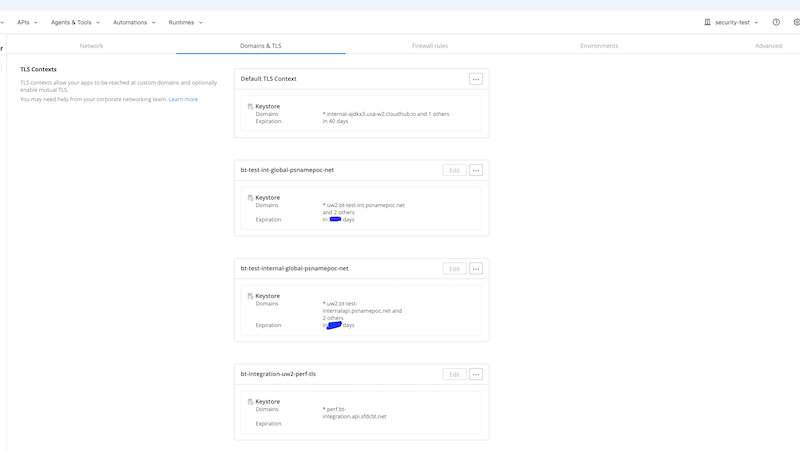
are associated with Certificates that are issued by an authorized CA system mostly used for TLS termination at ingress, Securing vanity domains and Enabling HTTPS endpoints
Building a secure foundation with SSL in MuleSoft CloudHub
Enabling SSL certificates in MuleSoft CloudHub is a fundamental step toward establishing secure, reliable, and enterprise-grade integrations. By implementing proper certificate management, organizations can ensure encrypted communication, protect sensitive data in transit, and build trust with consumers and partner systems.
Whether using CloudHub 1.0 with Dedicated Load Balancers or CloudHub 2.0 with Private Spaces and TLS contexts, SSL plays a critical role in securing API endpoints and supporting modern security standards. Beyond just enablement, maintaining a robust SSL strategy including timely certificate rotation, proper domain configuration and alignment with organizational security policies ensures long-term stability and compliance.
Source link