
Short test Ugreen 240W USB-C charging cable with display – and addition to the Satechi test | News

 USB-C is a blessing. It gives us a uniform connection for power and data across numerous devices in everyday life. Regardless of whether it’s a smartphone, tablet, camera, smaller consumer electronics devices, LED lamps or countless household gadgets: in principle you only need one charger/power supply for everything. And theoretically only one type of cable.
  Being able to charge batteries quickly requires a few things: the right charger, a suitable cable and of course a device that is compatible with high performance. But even when everything is given, it doesn’t always work out perfectly.
Unfortunately, in practice there are often a few more, but USB-C is actually a big step forward not only from a consumer perspective, but also in terms of avoiding electronic waste. – Also thanks to the EU, which demanded and enforced a uniform standard.
| Designation | USB-C cable 240 W with display |
| Recommended price (€) | from around 12 |
But standardization also has its limits. A weak point in the concept are the cables. Even if they always have the same plug and fit into every USB-C socket, that doesn’t mean that every USB-C cable is equally suitable for maximum data bandwidth and for every power supply. As already noted in the test of the Satechi ChargeView 140W Desktop Charger, cables must follow the latest developments in the interface standard. For example, to charge batteries with up to 240 W, a special USB-C cable with PD (Power Delivery) 3.1 specification and a so-called E-Marker chip is required. However, these do not also meet the highest requirements for fast data transmission. The user has to decide which cable is the best choice for what. And occasionally new cables simply have to be purchased because the old ones do not meet the latest specifications. This creates a lot of electronic waste again, because there are electronic circuits with small multipedes in the tiny cable plugs.
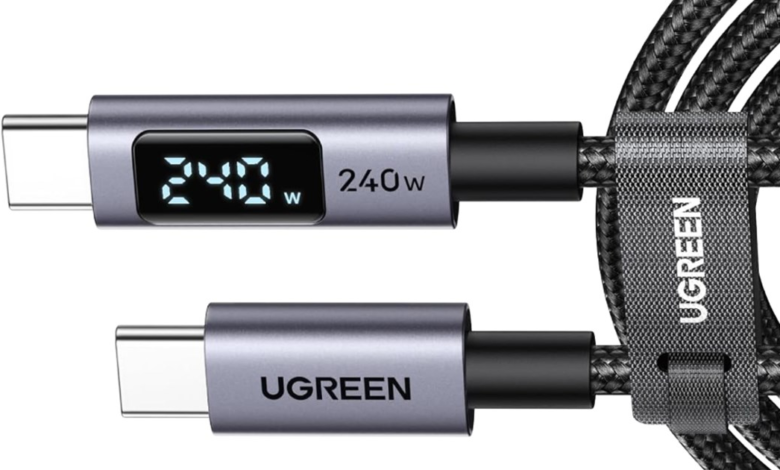
 The right cable for the right purpose. This principle also applies in times of USB-C. UGREEN USB-C charging cable 240 W with display (approx. 12 euros/1 m).
In order to be able to charge battery-powered components with the highest possible power (theoretically maximum 240 W), suitable chargers and USB-C cables designed for this are required. The Satechi ChargeView does not come with such a cable – and is probably already available in very few households. Not for me either, although a considerable amount of USB-C strips of all kinds have now accumulated.
In order to make optimal use of the possibilities of the Satechi ChargeView (and similar chargers), I bought a corresponding cable. Not one from Satechi, which of course also has some on offer, but one via Amazon from the UGREEN brand. This lured me with a little gimmick in the form of a tiny display in the connector housing. In 1 meter length it only cost a very manageable around 12 euros (price changes up or down possible at any time).
Practice: It’s loading!
The cable with the handy Amazon name “UGREEN 240W USB-C to USB-C cable with digital display, PD3.1 fast charging cable with 480 Mbps data transfer and E-Marker chip for iPhone17/16/15/14/13, Galaxy S25/S24, MacBook, iPad Pro(1M)” does not contain any surprises. With the exception of the small display, of course, which alternately shows the electrical power in watts, the voltage in volts and the current in amperes as soon as it is connected to a consumer. Then it is permanently on. It only turns off when unplugged.
 The iPad Pro M4 charges with a maximum of 35 W. You don’t need an E-Marker cable with PD 3.1 for this.
An important note for customers here is the so-called E-Marker Chip (Electronically Marked Cable), which transmits information about the cable to the host/connector. Briefly summarized:
- Identification: tells the device and host that it is an electronically marked (EMarked) cable.
- Current/power specifications: indicates the maximum current or charging power (e.g. 3A, 5A) and supported voltages to enable devices to conduct secure power delivery negotiations.
- Data rate/signal quality: reports the supported USB protocols and data transfer rates (e.g. USB 2.0, USB 3.x, USB4, or alternate modes such as DisplayPort).
- Configuration signals: supports A/V alternate modes and correct pin assignment (e.g. for cables with symmetrical/revolving assignments).
- Security/Functionality: Prevents a host from switching higher currents than the cable can handle with an inferior cable; enables correct negotiation of PD profiles.
 The power display in the small display does not differ significantly from what the Satechi charger shows. However, the constant change every 3 seconds makes it difficult to obtain an accurate reading over a longer period of time.
USB-C cables without an E-marker are usually limited to 3 amps or less; Cables with an E marker can be designated as 5 A cables and can therefore be used, for example. B. Support 100W+ Power Delivery.
In my case, I had to find out whether I could use the Satechi Charger in conjunction with the Ugreen cable to charge certain devices faster than was previously the case. This in turn requires components that also support appropriate fast charging via USB Power Delivery.
This doesn’t help with my iPad Pro M4, because Apple’s tablet of this generation doesn’t support more than around 35 W. I’ve achieved this before with any 3A cable. Only my MacBook Pro M4 currently supports PD charging with up to 140 W*. With the cables used so far, more than around 35 W of power could never be accessed, which is significantly less than the Satechi CahrgeView can handle. And with the Ugreen cable?

In short: Yes, that’s more possible. Even though the theoretically possible 140 W was not nearly achieved in my previous charging attempts (with around 60% remaining charge at the start of the charging process). At just under 90 W it was over, as documented in the picture above this paragraph. In a later charging cycle, I tested whether a lower battery level was necessary in order to push the charging curve to higher peaks. But even when charging started at just over 20% battery level, there was no more than just under 90 W left. It’s quite fast, but that’s far below Satechi’s promise. To the best of my knowledge and belief, I have met all the requirements to be able to achieve at least approximately 140 W.
Therefore, a question for the REWIND readers: Have you (demonstrably) been able to achieve higher charging performance on the MacBook Pro M4 or higher with a different charger/cable?
*Requirements: The power supply and cable must support USB-PD 3.1 Extended Power Range (EPR) (which is given here).
Conclusion: Informative cable at a low price for fast charging
USB-C can do a lot, but not everything at once. A cable like the one discussed here is required to achieve the current highest performance of the Power Delivery Standard 3.1. A maximum of 240 W is possible, but in reality it will rarely be more than 140 W for the time being. If any. See text.
Accordingly, the UGREEN USB-C cable 240 W is less suitable as a high-speed cable for data transfer or as a monitor cable, because it is limited to approx. 480 Mbps in this area. Users who want to make the most of fast SSD storage or high-resolution USB-C monitors need a different cable with a USB-C connector. Preferably a Thunderbolt 5 cable.
The only true one-for-all USB cable remains wishful thinking. And keep your eyes open when buying cable. USB-C only offers a pleasing simplification thanks to standardization when it comes to the connector shape.




